Search case files, faster
Avoid reading duplicate pages
Hide duplicates and blank pages to review later.
Eliminate repeat searches
Search multiple terms in multiple files with one search.
Stop drowning in document dumps
Find every needle in the haystack.
“I barely made a dent searching defendant's document dump with Adobe Acrobat. Parity found what I needed before I finished my cigar break!”
— J.D. Smith, Trial Lawyer

6 Ways Parity Speeds Up Doc Review
Whether you're searching 10 PDFs or 10,000, find things quickly, stay organized, and work with your team.
Work Faster
- Stop jumping from PDF to PDF
- Save custom searches for the future
- Flag pages to read, mark up, or export
Search Smarter
- Search multiple terms at once
- Search an entire case file at once
- Search PDFs like you search case law
Filter Out Duplicates
- Skip past blank pages and duplicates
- Manually check whenever you like
- Ignore repetition in medical notes
OCR While Working
- Don't wait on OCR to start reading
- Don't wait on OCR to start searching
- Auto-highlight any "Words of Interest"
Share Safely
- Save locally or on your firm's server
- Review files alone or in assembly lines
- Save all your data in a smaller file
Mark Up for Trial
- Group pages to review or export
- Export with cites and page numbers
- Click any page to open its source file
Jumping past duplicates and blanks, and searching everything at once. It makes everything faster!
— JoAnne Moore, Personal Injury Paralegal

Plaintiff Parity vs. Your PDF Program
Large defense firms access features like Parity's through costly document management systems.
 |  |  |
|---|---|---|
| Read and search individual PDFs | ||
| Search all PDFs with one search | ||
| Search multiple terms with one search | ||
| Perform advanced and Boolean searches | ||
| Save custom searches for future case work | ||
| Skip past duplicates and blank pages, revisiting when needed | ||
| Instantly jump to the original PDF of any page in a case file | ||
| Save key pages in different groupings to review/support your case | ||
| OCR and search quickly with internet standard technology | ||
| Save and share all casework in a lightweight and secure file |
I can really see the value. I wish this was around when I was practicing.
— Paul Moorman, Senior Law Librarian
Save Time with Every Search
Plaintiff firms regularly lose time searching PDFs one word at a time, one doc at a time. And defense firms know it.
Westlaw, LexisNexis, and Google allow you to do much more.
- In preparing your medical malpractice case you need every mention of words like stress, anxiety, depression, anxious, and panic. You lose time searching one word at a time.
- In searching the whole case file for each of those words, you lose time searching one doc at a time.
- In reviewing search results, you lose time rereading and comparing the same duplicated page over and over.
This is the tedious work defendants use to bury your team. Unlike large defense firms, few plaintiff firms can afford tens of thousands for comprehensive document management systems. But all plaintiff firms review docs, and they do so every day.
That's why we created Plaintiff Parity...
With Parity, you can find every term, in every PDF, with one search. You can save key pages for review, annotate, and share your work.
- To move quickly, search for every synonym at once.
- To find everything in the case file, search every document at once.
- To skip duplicate and blank pages, filter them out. Check them later under "Hidden Pages."
Large defense firms have associates and costly systems to do this. You don't need either. With Parity, they can't bury you in doc review any more. We encourage you to try it for yourself…
Contact Us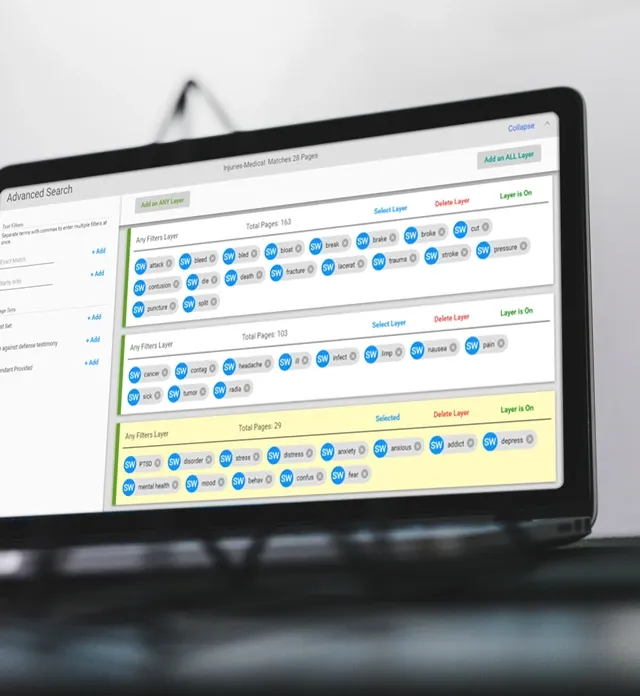
Join the Plaintiff Firms Already Using Parity
Here’s what users say…

The defendant 'hid the needle' and we found it in a couple hours. Fantastic!
J.D. Smith
Trial Lawyer

When reviewing hundreds of pages this can really make a difference.
Lauren Grantham
PI Paralegal, Dax F. Garza, P.C.

I'm not a big software user. But this saves me so much time!
Anthony Alfieri
Trial Lawyer, Law Office of Anthony Alfieri

Doc review is a primary service we offer plaintiff firms. Parity makes it so much faster.
Patrice Asimakis
Director of Legal Services, Nora.Legal

A great way to enhance legal work and make it more efficient!
Lauren Au
President, USC Law's Legal Tech Association

We're always looking for ways to help plaintiff firms. A game-changer!
Joseph Di Gangi
Settlement Planner, Elana Financial
Frequently Asked Questions
There’s no limit. Some PDF Viewers render pages before you can start working. Parity renders them as you work and only needs to render once. Millions of pages become instantly searchable and stay that way.
Yes. Anyone can see and build on your work if they have Plaintiff Parity and access to your workspace file.
No. Parity is unlike many PDF programs that modify the source file to make words searchable. Instead, Parity allows you to view all your docs in one place by extracting digital information from the source files. This way, the source files remain unchanged.
Parity stores all data outside the source PDF files in one lightweight, shareable, encrypted JSON file. This technology is an industry standard for serializing and transmitting structured data in a secure fashion.
Plaintiff Parity is PC compatible with Windows 10. Mac computers using Parallels can run Windows on a virtual machine.
We're always looking for ways to help plaintiff firms. A game-changer!
— Joseph Di Gangi, Settlement Planner
Want to See Parity in Action?
Tell us about your firm and how you review case files today and we'll show you how Parity can save your team time.